How to Copyright a Photo (and How to Prove When It Existed)

If you took the photo, the copyright is almost certainly yours already. Nobody has to grant it, no form has to be filed and no fee has to be paid. That has been true in the United States since 1989, when the notice requirement was dropped, and in most of the world for far longer. (The usual exceptions are photos taken as part of a job or under a contract that hands the rights to someone else.)
So why do so many people search "how to copyright a photo"? Because the question they really have is a different one: how do I show it is mine if someone copies it? Protection is automatic; evidence is not. This is precisely where the standard guides stop short. They tell you to register, to add a notice and to watermark, which are all reasonable steps, and then skip a question that tends to come up when two people claim the same image: can you show that this exact photo existed, in this exact form, by a given date?
Here is the whole map: what you already have, what registration adds and what it costs, what notices and watermarks do and do not do, why the date inside your file is weak evidence on its own and how to record a date that anyone can check, in about a minute.
The copyright is already there
The Berne Convention, the treaty behind copyright law in more than 180 countries, says that protection must not depend on any formality. Press the shutter and, as long as the photo is original, the copyright exists. It gives its owner the exclusive right to copy, publish, sell and license the image, in the United States and the European Union for the photographer's lifetime plus 70 years. Who that owner is depends on the circumstances: usually the person who took the photo, sometimes an employer or a client when the photo was taken on the job or the rights were assigned by contract.
What copyright does not give you is a record. No office knows the photo exists and nobody holds a dated copy. If someone else claims the image, you will want something to show beyond your word. Everything below is about building that record.
Registration, in numbers (United States)
The US is the exception that explains the confusion. Copyright there is also automatic, but the United States Copyright Office runs a registration system with real consequences, and most "how to copyright" advice online is written for it.
What it costs today, per the Office's own fee schedule:
| Filing | Fee | Notes |
|---|---|---|
| Single application | $45 | one work, one author who is also the claimant, not made for hire |
| Standard application | $65 | any other single work |
| Group of photographs | $55 | up to 750 photos by the same author with the same claimant; published and unpublished photos go in separate group applications, and a published group must all date from the same calendar year |
| Paper filing | $125 | the online route is cheaper and usually faster |
What it takes: for claims closed between April and September 2026 the Office reports an average of 3.4 months for online filings that need no correspondence (the spread runs from 1.2 to 5.5 months) and 5.3 months when the examiner has questions, which happened on 28 percent of them (up to 9.6 months). The effective date of the registration is the day the Office received an acceptable application, deposit (the copies of the photos) and fee, not the day the certificate is issued.
What it adds, for photos published commercially in the US: for a US work, an infringement lawsuit cannot be filed until the Office has registered (or refused) the claim. Statutory damages ($750 to $30,000 per work, as the court considers just, and up to $150,000 if the infringement was willful) and attorney's fees are only on the table when the registration predates the infringement or was made within three months of first publication; otherwise the claim is limited to actual damages and profits. And a registration made within five years of first publication counts as prima facie evidence that the copyright is valid and of the facts stated in the certificate.
Taken together, that is why many photographers who sell their work register in batches: $55 covers up to 750 photos. Whether it is worth doing depends on where you publish, how you use your photos and whether you would ever enforce your rights in a US court. That call is yours, ideally with a lawyer when real money is involved. What registration is not is quick: it is a US procedure with US fees and it takes months.
In Europe: nothing you must register, and some optional registries
In the European Union and the United Kingdom no registration is needed for copyright to exist. The UK Intellectual Property Office says it plainly: you get copyright protection automatically, you do not have to apply or pay a fee and there is no register of copyright works in the UK.
Spain is one of the countries with an official, optional registry. The Registro de la Propiedad Intelectual is voluntary, and an entry gives you a presumption that the registered rights exist and belong to you, which holds until someone proves otherwise (article 145.3 of the Spanish intellectual property law). Applications go to the central registry or to the regional ones, online or in person. At the central registry the 2026 fee for an application is 8.26 euros online and 14.97 euros in person, and regional registries set their own. How much weight a Spanish entry carries in another country depends on that country's law and on the court looking at it. And like any registry, it only starts counting on the day you file: it says nothing about a photo you shot last year until you register it.
What a notice and a watermark do, and do not do
The © line (the symbol, your name, the year) has not been required in the US since 1989 and was never required under Berne. It still earns its place: it tells people who to ask, and in the US a notice on the published copies takes most of the weight out of an "innocent infringement" argument when damages are set. A visible watermark goes one step further and discourages casual reuse.
Neither one proves much by itself. Anyone can type a © line with any name and any year, and anyone can paste a watermark on a copy. In a dispute they are claims, exactly like the other party's claims. They help with attribution and deterrence; they say little about dates. The same goes for the old trick of mailing yourself a sealed envelope, which shows less than it seems to.
The date inside the file is easy to change
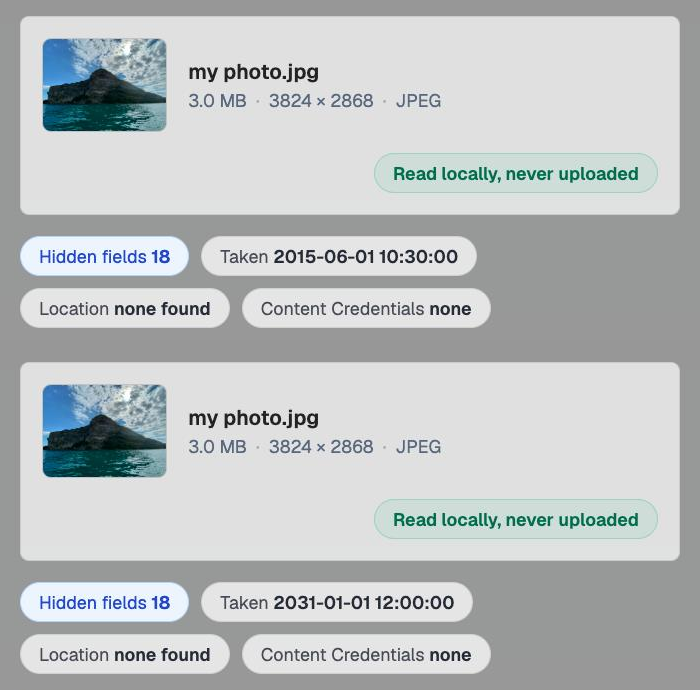
Every photo carries metadata: the camera, the settings, often the GPS position and, crucially, the date and time it was taken. People reach for it as evidence, and on its own it is weak for two reasons.
First, it travels badly. Most chat apps re-encode photos and discard the metadata on the way. In the behavior we documented (our own iMessage test, a peer-reviewed study of twelve devices and the developers' documentation), iMessage, AirDrop and email attachments kept it; WhatsApp, Telegram and Signal stripped it when sending a photo and kept it when sending a file. By the time your photo has been forwarded twice, the date may well be gone.
Second, and this is the real problem, it is trivially editable. The capture date is a text field. Free tools rewrite it in one command, and our own photo metadata viewer and cleaner removes all of it in one click, without touching a pixel. That does not make metadata worthless: it can still help when other things back it up, such as the original camera file, a backup or the messages you sent that day. But a date that anyone can change, in a file that anyone can hold, should not be the only thing you rely on. It is a note someone left inside the file.
A date anyone can verify, in a minute
When the argument is about dates, what helps most is independent evidence that this exact file existed, unchanged, by a particular date. Not a date inside the file, a date attached to the file from the outside, by something neither party controls. That is what timestamping does. It is one piece of evidence among others (contracts, drafts, correspondence, the publication history) and it answers one question only: when.
A note before the walkthrough, because we sell this service. EMOZ records a file's fingerprint and the date in a public record that anyone can check. That is a technical fact, and it is all we claim. It does not establish who took the photo or who owns the copyright, and how much weight it carries in a formal dispute depends on the country and on who assesses it. For anything valuable or headed to court, talk to a lawyer.
Here is what it looks like with a real photo.
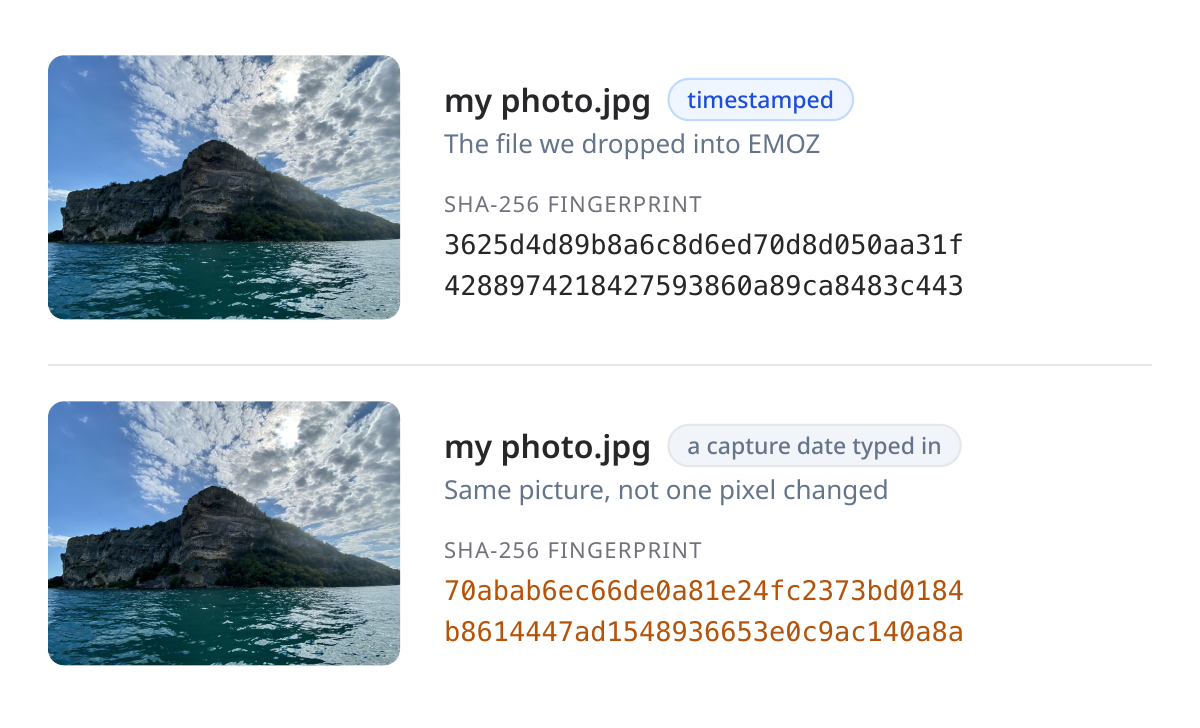
- Drop the original into EMOZ. Your browser computes the photo's SHA-256 fingerprint on your device. The photo itself is never uploaded. What reaches EMOZ is the 64-character fingerprint, the file's name and the details you enter for the certificate (your name and your email). You can watch this happen in your browser's network tab, and we encourage you to.
- The fingerprint is written to an independent, public record, together with the time it was received. That record is designed so that entries cannot be changed or removed afterwards, not even by us. From that moment there is a public entry that says: a file with this exact fingerprint existed no later than this date. (Today that record is a public blockchain; the method does not depend on which anchor sits underneath, and the check below stays the same.)
- You download a PDF certificate with the fingerprint, the date and the reference to the public entry, and you keep the original photo exactly as it was. Keep the two together: the certificate points to the record, and the original is the file that gets checked against it.
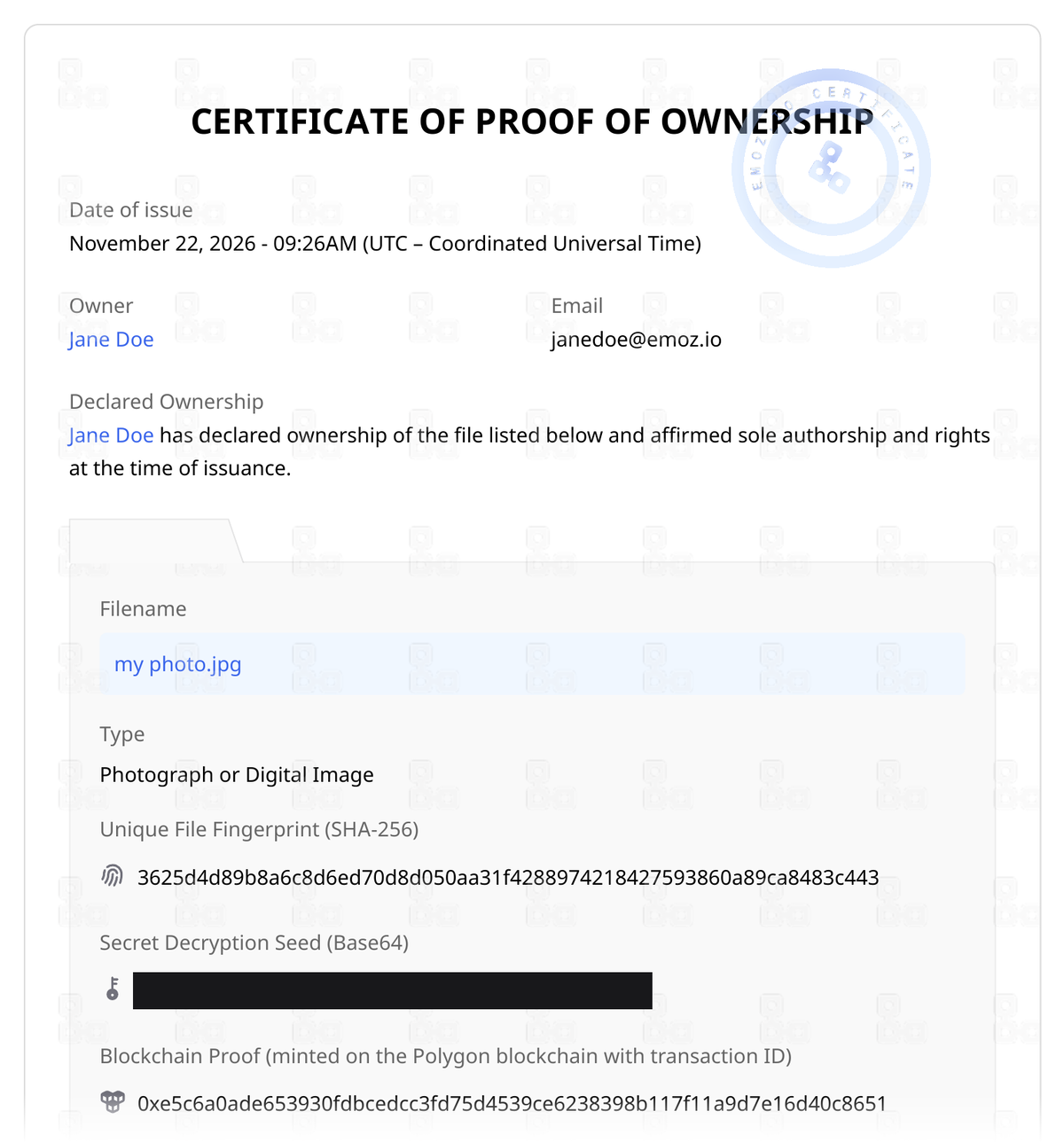
Checking it later needs nothing from us, and it is easy to do yourself. Anyone who holds the photo can recompute its fingerprint with our free hash calculator (or any SHA-256 tool), compare it with the one in the certificate and confirm the dated entry on our verification page, or directly in the public record, which exists independently of EMOZ. If the fingerprints match, the file in front of you is the one that was recorded, which means it existed no later than that date. If a single pixel was changed, they will not match, and that is the point.
The same goes for changes you cannot see. While preparing this example we timestamped the photo first and removed its metadata afterwards with our own cleaner: the picture looked identical, the file was not, and the cleaned copy no longer matched the certificate. We had to timestamp the cleaned copy again, and that is the one you see here. Decide which version is your original before you timestamp it, then keep that exact file.
And if fingerprints and public records are more than you want to deal with, or the stakes are high enough that you want someone else to vouch for the result, you are not on your own. An IT professional or a digital forensics expert can run the same check and explain it on your behalf: comparing a file's fingerprint against a reference value is routine work in digital forensics, and the dated entry is public, so they can read it on their own, with no EMOZ account needed. In a formal dispute they may also look at how the file was kept and where it came from, which is one more reason to store the original untouched.
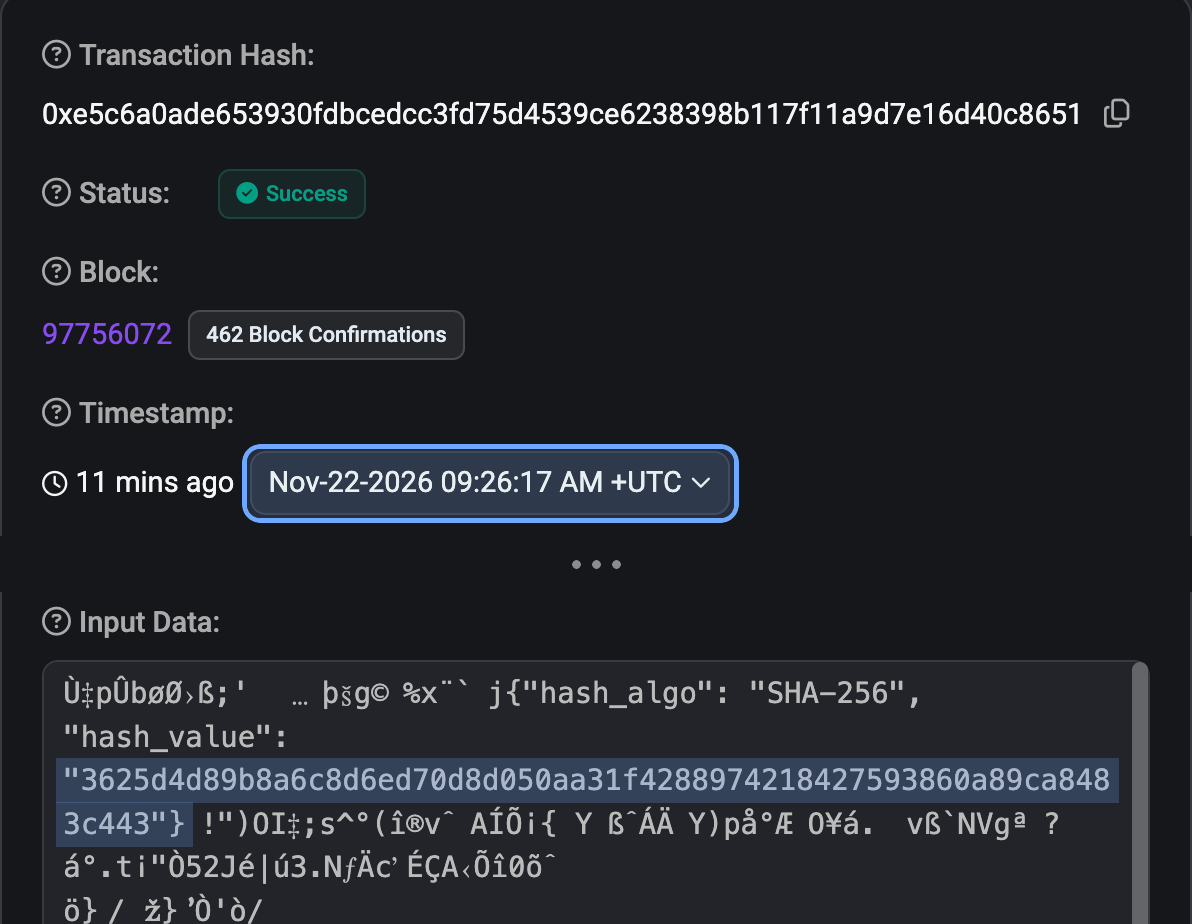
So, to be precise about what you end up with. A timestamp shows existence and integrity: this file, in this form, no later than this date. The certificate also carries your name and your statement that the work is yours, which is a dated claim, not proof of it. It does not show who took the photo, it does not register or grant a copyright and it does not replace registration where registration matters. Registration gives you a date too, the day your filing reached the Office. What a timestamp adds is that it takes a minute, works the same in every country and never requires sending the photo to anyone.
How the pieces fit together
None of these steps replaces the others, and which ones make sense depends on where you live, how you publish and what the photos are worth to you. This is how we would combine them for photos that matter.
- Timestamp the original before it leaves your device. It takes a minute and costs about 10 euros per photo, roughly a pizza (the test version is free, and meant for trying the flow). It is also the one step that cannot be done after the fact: the date only helps if it was recorded before anyone was arguing. Good moments are the export you post, the file you send to the client and the shot you submit to the competition, in short the last thing you do before a photo leaves your device.
- Add the notice and watermark as you see fit. Cheap, harmless, good for attribution.
- Look at registration when enforcement is a real possibility. For photos published commercially in the US that usually means the $55 group filing or the $45 single filing, and the three-month window after first publication is worth keeping in mind. In Spain, the registry if you want the presumption it gives. In the UK there is no register at all.
If a question ever comes up, each piece does a different job. A registration, if you have one, is evidence of the rights stated in it. The certificate and the original photo, whose fingerprint matches a public record dated before the copy appeared, show when the file existed, and they can be checked from any country. The correspondence around the publication fills in the rest. Which of them matters most, and how much, is for a lawyer and ultimately a court to say.
The bottom line
Your photo is almost certainly yours the moment you take it; the hard part was rarely ownership, it was evidence. Registration is a solid tool for US enforcement, with a price tag and a calendar attached. A timestamp is the complement: it takes a minute, it can be used for any digital photo, including the thousands that will never justify a filing, and it leaves you with a dated record that anyone can verify. That record is public and independent, so it rests on more than our word: it is built to stand on its own, beyond EMOZ as a company. Many services keep theirs on their own servers, and that independence is precisely what sets EMOZ apart. Timestamp the photo before you post it, and keep the original.
Sources and further reading
- United States Copyright Office, fee schedule and registration portal with current processing times (cases closed April 1 to September 30, 2026).
- 17 U.S. Code: § 401(d) (weight of a notice), § 410(c) and (d) (prima facie evidence, effective date), § 411 (registration before suit), § 412 (statutory damages and fees), § 504(c) (amounts).
- Code of Federal Regulations, 37 CFR § 202.4(h) and (i): group registration of unpublished and published photographs.
- WIPO, Berne Convention, article 5(2): no formalities.
- UK Intellectual Property Office, copyright overview.
- Spain, Registro de la Propiedad Intelectual, its 2026 fees and article 145 of the Ley de Propiedad Intelectual.
- Our own tests: which apps strip photo metadata and the photo metadata viewer.
Fees, processing times and statute references were checked against the primary sources above on November 22, 2026. The worked example uses a photo we took and timestamped ourselves that day, with a sample name and email on the certificate.

 idea
