What Your Photos Hide: The Apps That Strip Metadata, and the Ones That Send It Along
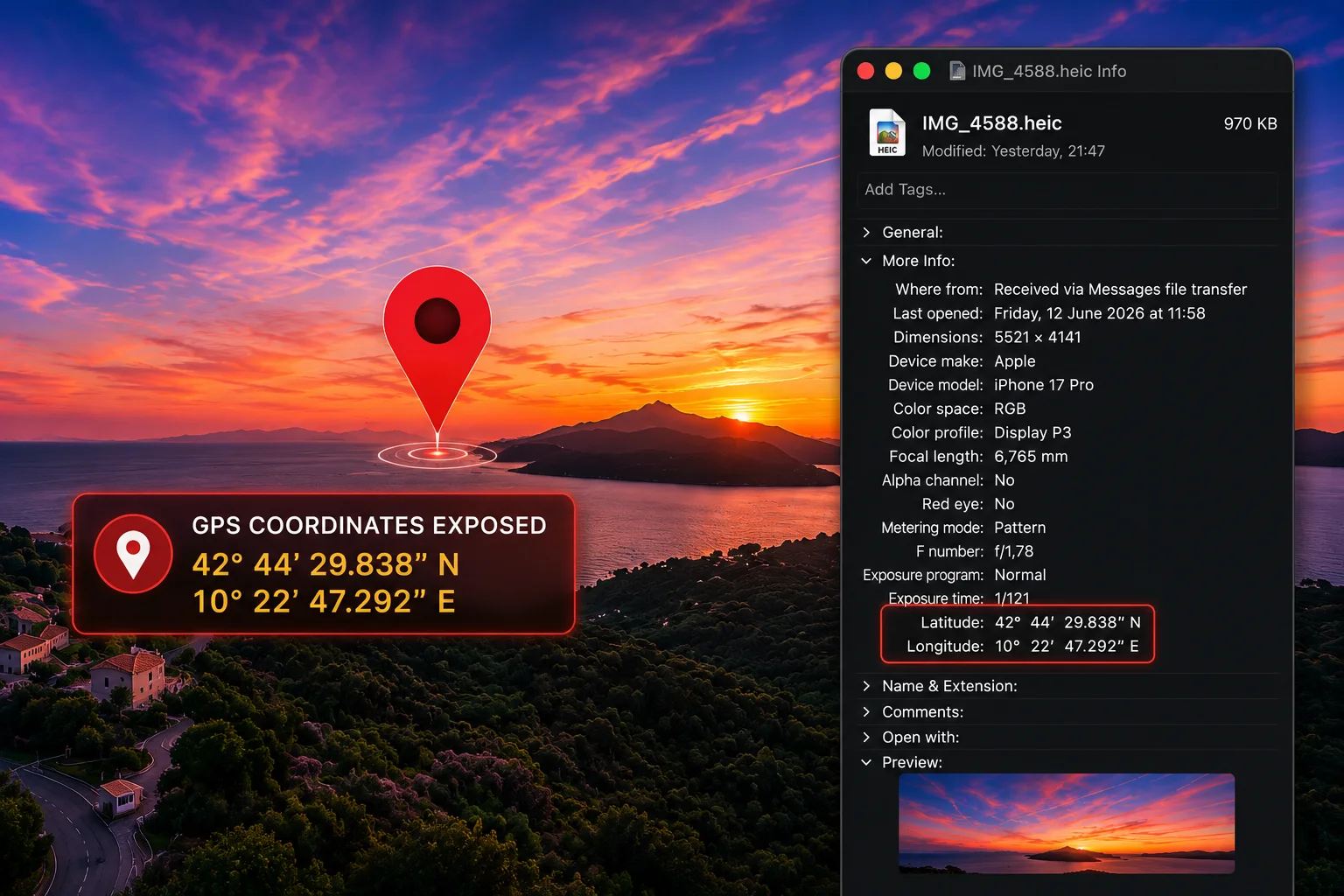
Yesterday we received a photo over iMessage. A sunset over the sea, the kind of picture people send every day without a second thought.
We saved it on a Mac, right-clicked the file and chose Get Info. No special software, no technical skills, nothing you would call hacking. This is what was inside:
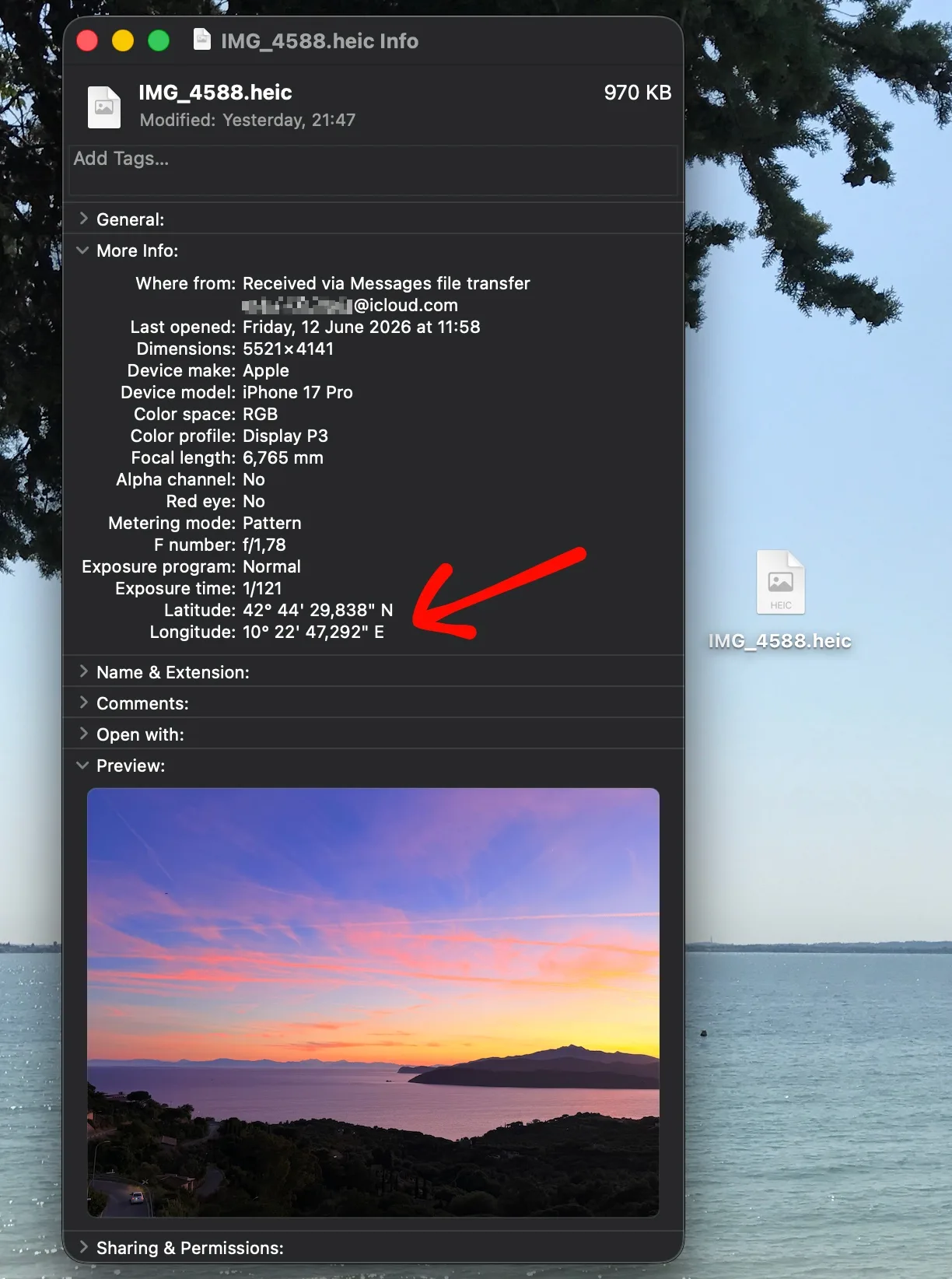
The exact latitude and longitude of the spot where the photo was taken, down to fractions of a second of arc. Paste those coordinates into any map and you are standing where the sender stood. Also in there: the phone model, the precise moment of capture and the camera settings.
The sender had no idea. Almost nobody does. That is the problem this post is about.
What is actually inside a photo
Every photo from a phone or camera carries a block of hidden data called metadata (EXIF is the most common format). Depending on the device and settings, it can include:
- The GPS coordinates of where the photo was taken
- The exact date and time of capture, to the second
- The phone or camera model
- The lens, exposure and editing software
- Sometimes an author or copyright name
None of it is visible in the image itself. All of it travels inside the file. You can see everything one of your own photos carries in a few seconds with our free photo metadata viewer: it runs in your browser and the photo is never uploaded anywhere.
This has burned careful people before
The most famous case is John McAfee, the antivirus founder. In December 2012, while he was on the run in Central America, journalists traveling with him published a photo of him online. The photo, taken with an iPhone, still carried its GPS coordinates, and they placed him at a specific spot in Guatemala. Within a day he admitted where he was. NPR's headline at the time said it all: "Betrayed by metadata". One of the most security-conscious people in tech had his location given away by a picture.
You do not need to be a fugitive for this to matter. The New York Times told a quieter version of the same story back in 2010: Adam Savage, the MythBusters host, tweeted a photo of his car parked in front of his house, with a caption saying he was off to work. The geotag inside the photo handed his followers the exact coordinates of his home, together with the information that he had just left it.
If GPS metadata survives sharing, a recipient can often work out a home address, a workplace, a child's school, a hotel. Now think about where photos get exchanged with people you barely know: marketplace listings, email threads with strangers and, above all, dating. Location safety around dating is not a hypothetical concern: in 2024, researchers at KU Leuven analyzed fifteen popular dating apps and found that several let a malicious user pinpoint another user's position to within meters. The apps fixed what the researchers reported. The photos people exchange once a conversation moves off the app are a quieter channel that no patch covers: if a photo travels as an original file, the coordinates of where it was taken travel with it. Send one taken at home and you may have shared your street without ever typing it.
The one rule that explains everything
Whether your metadata reaches the recipient comes down to a single question, and it is not the one most people ask. It is not "is this app encrypted?". It is:
Does the recipient get a processed copy of the image, or the original file?
When an app re-encodes the photo to compress it (as most chat apps do by default), the metadata is usually discarded along the way. When an app hands over the original file untouched, everything inside it travels too.
This is why encryption is beside the point here. End-to-end encryption protects the message on its way to the recipient. It does nothing about what is inside the file once it arrives. An encrypted app can deliver your GPS coordinates perfectly sealed, directly to the person you sent them to.
It is also why "send as file" and "send as document" options deserve attention: they exist precisely to avoid re-encoding, which means they deliver everything, metadata included. "HD" photo modes sit in between: WhatsApp's HD photos, for example, are still re-encoded, just at a higher resolution.
Which apps strip metadata, and which do not
Here is how common ways of sharing a photo behave for the person receiving it. This table is not folklore: it rests on a peer-reviewed forensic study of twelve devices (Soni, June 2025), primary developer documentation and our own checks in June 2026. The iMessage row is the test you saw above. One honest caveat stands: apps change behavior without notice, so treat this as the state of things as of June 2026.
A few things in that table deserve a closer look.
iMessage is the one that surprises people. Apple's design philosophy here favors fidelity: you get the photo exactly as it was taken, which means you also get everything inside it. To be fair to Apple, the controls exist and they are clear: the personal safety guide documents the behavior openly, and the share sheet has an Options switch that strips the location before sending (tap Options at the top, turn off Location). The problem is not the design, it is awareness: most people have never heard of that switch. Note that it removes only the location: the timestamp and device details still travel. Two small mercies: photos taken with the camera button inside a conversation usually carry no GPS, and green-bubble SMS fallback compresses the photo so heavily that metadata rarely makes it.
The "photo mode vs file mode" trap. WhatsApp, Telegram and Signal strip metadata from a normal photo because they re-encode it; the June 2025 forensic study found document and file mode on the same apps delivered the original byte for byte, hashes identical, GPS included. The option that sounds like a quality upgrade is also a privacy downgrade, and the app shows no warning either way.
Stripped for viewers is not the same as private. When you post to Instagram, Facebook or X, viewers cannot read your GPS data from the published copy, but the platform received your original upload first. There is a twist: the file viewers download from Facebook or Instagram is not metadata-free. Meta strips your data and inserts its own tracking code (an IPTC field known as FBMD) into the copy. Chat apps in photo mode are actually better here: WhatsApp and Signal re-encode on your device before anything is uploaded, so in normal photo mode not even the platform receives your metadata.
Discord is cleaner than its reputation, with two exceptions. Online claims about Discord contradict each other, which makes it the best example of why testing beats folklore. A 2025 forensic study ran 149 controlled transfers and found that photos uploaded through the official apps arrive with the hidden data removed, location included. The two exceptions: Discord only cleans the most common kind of hidden data, so a photo that passed through an editing tool like Photoshop or Lightroom can still carry extra information, sometimes the location too. And videos or unusual file types pass through untouched, with everything still inside.
Bluesky puts the responsibility on app developers. The official Bluesky app cleans your photo on your own device before anything is uploaded, so not even Bluesky receives the hidden data. But Bluesky is an open network that anyone can build an app for, and the cleaning is up to whoever builds the app: Bluesky's own developer documentation says exactly that. Post through a third-party app that skips the step, and the original photo, hidden data included, gets stored and can be retrieved.
Don't take our word for it, or anyone's
The honest truth about every table like the one above is that it expires. Apps update, defaults change, "HD photo" features ship. The good news is that you can check any app yourself in under a minute:
- Send yourself a photo through the app (or ask a friend to send one back).
- Save the received image.
- Drop it into the photo metadata viewer.
You will see exactly what survived, including a count of every hidden field. The check happens entirely in your browser, the photo is never uploaded, and that claim is itself verifiable: anyone can open the browser's developer tools and confirm that nothing is transmitted.
What to do about it
First, a word about intent. None of this is meant to scare you away from sharing photos. With family and friends, metadata is usually harmless and sometimes genuinely useful: the date and the place a photo was taken are half the memory. The reason this article exists is that the data is invisible, so the choice may be made for you without your knowledge. Awareness of your digital footprint puts the choice back where it belongs: keep the metadata where it serves you, remove it where it does not.
With that in mind, a few habits cover almost every situation:
- Sharing with people you fully trust, inside one chat app's photo mode: you are probably fine.
- Sharing with strangers, by email, or as files: remove the metadata first. Our viewer doubles as a cleaner: one click produces a copy with the metadata gone and the pixels untouched, same resolution, same quality.
- On iPhone: before sending, tap Options in the share sheet and turn Location off. Disabling Location for the Camera app entirely also works, though we do not recommend it: searching your own library by place and seeing Memories grouped by trip is genuinely useful. Strip on the way out, not at the source.
- Posting publicly: the platform will probably strip metadata for viewers, but stripping it yourself first means the platform never receives it either.
The flip side: metadata is not proof
There is a mirror image to this whole story. The same metadata that leaks so easily is also trivially easy to edit or remove, and our cleaner demonstrates that in one click. So a date or a location embedded inside a photo proves nothing on its own: anyone could have written it there.
That cuts both ways. If you ever need a photo to count for something (the state of a flat on moving day, a car after an accident, a piece of work before sending it to a client), the metadata inside the file will not protect you. What works is the opposite of hiding: a tamper-evident timestamp of the photo's digital fingerprint, anchored on a public record that nobody can quietly edit. That is what EMOZ does, and the same privacy principle applies there too: the photo itself never leaves your device, only its fingerprint is recorded.
Two sides, one lesson. Metadata you do not control can expose you. Proof you do control can protect you. The difference is knowing what your files carry, and deciding for yourself.

 idea
idea